Orders management
Order Notice
When an order is placed, we send you an email with all the details, as well as the steps to follow to process the order.
You then have 4 days to process the order and confirm if the book is available. If we do not receive a confirmation answer within that time, the order will automatically be canceled and the client informed by e-mail.
In the email that we send you, we include a link so you can confirm the order as soon as possible.
Before confirming, always check that you have all the items in the order
Confirm an Order
It is very important that you confirm your Order as soon as possible so that we can inform the Buyer that the order is ready.
You have up to 4 days to do it, but the later, the more likely it is that the buyer will cancel the order because he found the same item at another supplier.
Steps to Confirm an Order
- Edit the Order
- Through the email we send you, click on the link "Confirm the order"
- Go to your Vendor Account > "Orders"
- Choose the Order
- Click on "Edit"
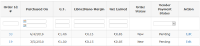
- Confirm items one by one
- Set the Shipment method
- Set the date
- Create Shipment
- Until you confirm all the items, the "Create Shipment" button is not enabled
- If you are missing an item, you can not create the shipment, See Cancel an order
- If you have to make an international shipment, click here for additional steps
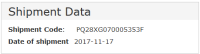
- The following data will be stored:
- Shipment Code
- Date of Shipment